
Mini PC NAS Build 2026: Turning a Small Form Factor PC into Storage
 12 min read
2,260 words
12 min read
2,260 words
Can You Build a NAS From a Mini PC in 2026?
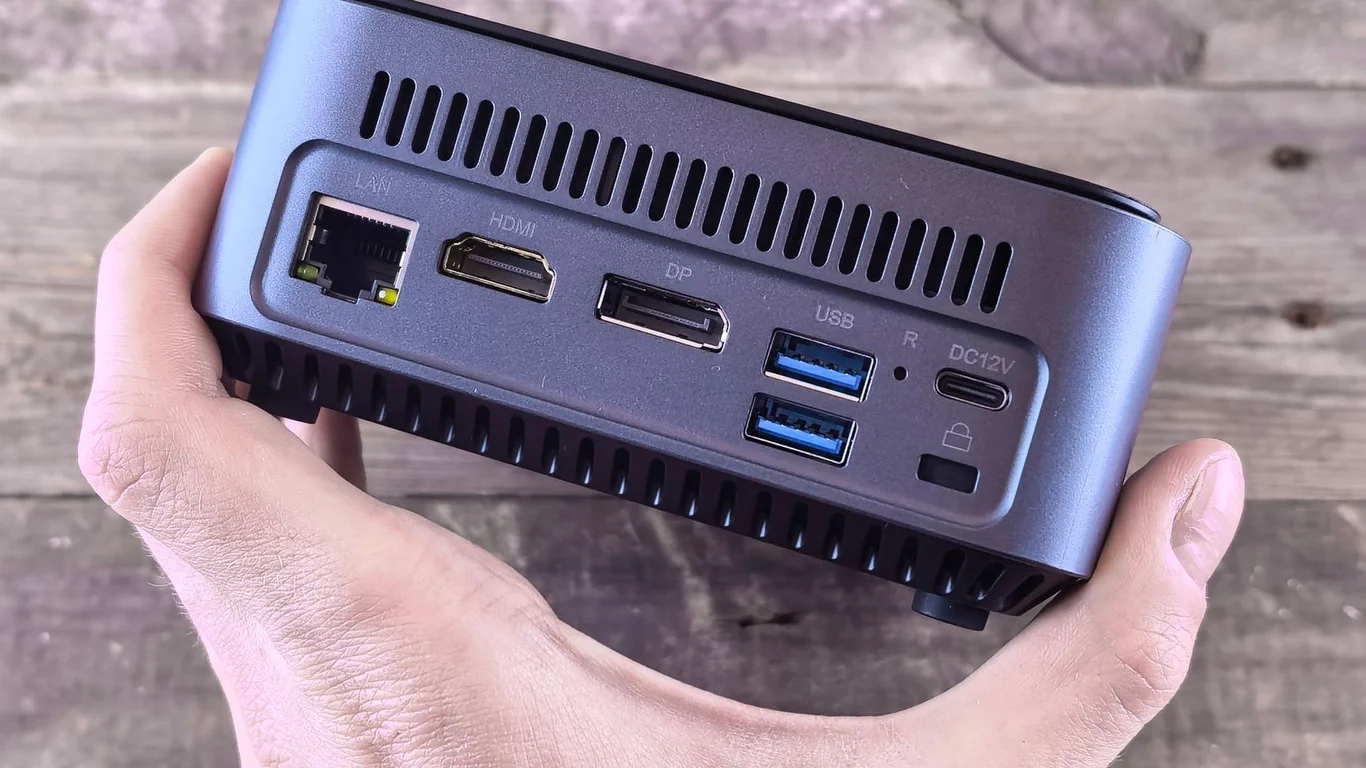
Yes, a mini PC NAS build is absolutely viable in 2026 — but only if you go in with your eyes open about the trade-offs. The core idea is simple: take a compact, low-power mini PC (think Intel N100, N305, or a used Lenovo ThinkCentre), install NAS software, and connect your drives via USB or a small external enclosure. The result is a tiny, silent server that sips power and fits anywhere. However, the storage ceiling is real — you will hit drive bay limits fast. This guide walks you through exactly where a mini PC NAS shines, where it falls short, and how to decide if it is the right build for your homelab.
What Are the Drive Bay Limitations of a Mini PC NAS Build?
This is the single biggest constraint of a mini PC NAS build. Most mini PCs have room for exactly one M.2 NVMe drive and possibly one 2.5-inch SATA SSD internally. That gives you a maximum of two internal drives — and often only one. You simply cannot fit standard 3.5-inch hard drives inside the case.
Compare that to a dedicated NAS case like the Fractal Design Node 304, which holds six 3.5-inch drives, or a Synology DS923+ with four hot-swap bays. The mini PC is trading storage capacity for its tiny footprint and low power draw. If you need more than 4-8 TB of usable storage, you will need to add external drives.
A mini PC with only one M.2 slot and no SATA ports cannot run a RAID 1 mirror internally without external hardware. Plan your storage expansion before you buy the PC.
Mini PC as NAS: USB and External Enclosure Options
Once you run out of internal bays, external storage is your only path forward. The most common approach is a USB-attached multi-bay enclosure. A 4-bay USB 3.2 Gen 2 enclosure (like the Yottamaster or Mediasonic ProBox) adds four 3.5-inch drive slots and connects over a single USB-C cable. This is the practical limit for most mini PC NAS builds — one enclosure with 4-5 drives.
How USB Enclosures Work With NAS Software
Modern NAS operating systems handle USB drives reasonably well. TrueNAS Scale and Unraid both recognize USB-attached disks and allow you to pool them into a single storage volume. You can create a RAIDZ1 or RAIDZ2 pool across drives in an enclosure, or use Unraid’s parity system. However, there is a catch: USB connections introduce a single point of failure. If the USB cable disconnects or the enclosure controller fails, all drives in that enclosure become inaccessible simultaneously.
For the best reliability, use a high-quality USB-C to USB-C cable and secure it with a cable tie. Avoid cheap USB-A cables that can wiggle loose over time.
RAID Configuration With External Drives
You have two choices for RAID with external drives: software RAID via your NAS OS, or hardware RAID inside the enclosure. Software RAID is strongly preferred. Enclosures with built-in hardware RAID controllers often use proprietary formats — if the controller dies, your data may be unrecoverable without an identical replacement. Software RAID (ZFS, mdadm, Unraid parity) keeps your data readable on any system that can mount the drives.
| External Storage Method | Max Drives | RAID Support | Cost (Enclosure Only) |
|---|---|---|---|
| Single USB 3.0 external HDD | 1 | None (JBOD) | $50-$80 |
| 4-bay USB enclosure (JBOD/Software RAID) | 4 | Software RAID via OS | $80-$150 |
| 5-bay USB enclosure (Hardware RAID) | 5 | Hardware RAID 0/1/5/10 | $150-$250 |
CPU and RAM Are Usually Fine — Storage Is the Real Constraint
One of the most common misconceptions about a mini PC NAS build is that the processor or memory will be the bottleneck. In reality, an Intel N100 or N305 CPU is more than adequate for file serving, media streaming, and even light Docker containers. These chips idle at 6-10 watts and can handle 1080p Plex transcoding without breaking a sweat. Even a used Intel NUC with an 8th-gen i5 is overkill for basic NAS duties.
RAM is similarly generous. Most mini PCs ship with 8-16 GB of DDR4 or DDR5, which is plenty for SMB file sharing, basic ZFS pools, or Unraid arrays. You only need more RAM (32 GB+) if you plan to run heavy virtualization, deduplicated ZFS, or dozens of Docker containers. The real bottleneck is always storage capacity — how many drives can you physically connect.
If you run TrueNAS Scale on a mini PC, be aware that ZFS performs best with at least 8 GB of RAM plus 1 GB per TB of raw storage for the ARC cache. A 16 GB mini PC can comfortably handle a 12 TB pool. Beyond that, you will see reduced read performance as the ARC fills up.
Best Mini PC for NAS: What to Look For in 2026
Not every mini PC makes a good NAS host. You need specific features that many consumer mini PCs lack. Here is what to prioritize.
Must-Have Features for a Mini PC NAS
- At least two M.2 NVMe slots — allows internal RAID 1 mirror for the OS or a small fast pool.
- USB 3.2 Gen 2 (10 Gbps) or Thunderbolt 4 — necessary bandwidth for multi-drive external enclosures.
- Intel 2.5GbE or better — avoid 1 GbE only; your external drives will be bottlenecked.
- Expandable RAM (SO-DIMM slots) — 8 GB soldered RAM is not enough for ZFS with large pools.
Top Mini PC Picks for NAS
| Model | CPU | RAM | Storage Slots | Networking | Price Range |
|---|---|---|---|---|---|
| Beelink EQ13 | Intel N150 | 16 GB (soldered) | 1x M.2, 1x 2.5″ SATA | 2.5GbE | $180-$220 |
| Minisforum MS-01 | Intel i5-1340P | 32 GB (2x SO-DIMM) | 2x M.2, 1x 2.5″ SATA | 2x 2.5GbE, 2x 10GbE SFP+ | $450-$550 |
| Lenovo ThinkCentre M90q Gen 4 | Intel i5-14500T | 64 GB (2x SO-DIMM) | 2x M.2, 1x 2.5″ SATA | 2.5GbE | $350-$500 (used) |
| Intel NUC 13 Pro | Intel i7-1360P | 64 GB (2x SO-DIMM) | 2x M.2, 1x 2.5″ SATA | 2.5GbE | $400-$600 (used) |
The Minisforum MS-01 is the current king of mini PC NAS builds because of its dual 10GbE SFP+ ports and dual M.2 slots. It costs more, but it removes the network bottleneck entirely.
Mini PC vs Dedicated NAS Case: When Does the Mini Stop Making Sense?
The mini PC NAS build is a compromise. It works brilliantly for specific use cases, but falls apart once your storage needs grow. Here is the honest breakdown.
Mini PC NAS is a Good Fit When
- You need 4-8 TB of usable storage total.
- Power consumption is your top priority (under 15W idle).
- Space is extremely tight — desk, shelf, or entertainment center.
- You already own a mini PC and want to repurpose it.
- Noise must be near-silent (mini PCs have small, quiet fans).
Mini PC NAS is a Bad Fit When
- You need 20+ TB of storage or plan to expand beyond 4-5 drives.
- You want hot-swap drive bays for easy replacements.
- You need ECC RAM for ZFS data integrity (mini PCs lack ECC support).
- You want a single-box solution — no external enclosures or cables.
- You plan to run heavy virtualization with many VMs.
Software Choices for Your Mini PC NAS Build
Your mini PC can run the same NAS operating systems as a full tower server. The choice depends on how you want to manage storage.
TrueNAS Scale vs Unraid on a Mini PC
Both work well, but they have different strengths on limited hardware. TrueNAS Scale uses ZFS, which demands more RAM but gives you checksumming, snapshots, and excellent data integrity. Unraid is more flexible with mismatched drive sizes and runs well on as little as 8 GB of RAM. For a mini PC with 16 GB RAM and external USB drives, Unraid is often the smoother experience because it does not require identical drive sizes and handles USB disconnects more gracefully.
For a deeper comparison, see our TrueNAS vs Unraid guide.
Other NAS Software Options
- Proxmox — run a lightweight NAS VM (OpenMediaVault, TrueNAS Scale) on top of Proxmox, giving you the flexibility to add other VMs and containers.
- OpenMediaVault — very lightweight, runs on 2 GB of RAM. Great for a simple SMB/NFS file server.
- CasaOS — beginner-friendly, Docker-first interface. Good for media serving and app hosting.
How to Reduce Power Consumption on a Mini PC NAS
One of the biggest advantages of a mini PC NAS build is its low power draw. You can optimize it further with a few tweaks. For a full guide, read our article on How to Reduce Your NAS’s Power Consumption.
- Enable ASPM (Active State Power Management) in BIOS for the M.2 slot and USB controller.
- Set the CPU power limit in BIOS to 15W or lower (PL1/PL2 settings).
- Use an SSD for the OS and a USB enclosure that supports UAS (USB Attached SCSI) for better power management.
- Spin down external HDDs after 30 minutes of inactivity in your NAS OS settings.
When a Mini PC NAS Stops Making Sense — and What to Build Instead
Once you need more than 4-5 drives, the mini PC approach becomes cumbersome. You end up with three or four separate USB enclosures, each with its own power brick and cable. Cable management becomes a nightmare, and the risk of a USB disconnect increases with every added device. At this point, a dedicated NAS case is the better investment.
A purpose-built NAS case like the Fractal Design Node 304 or Jonsbo N3 holds 6-8 drives internally, with a single power supply and no external cables. Pair it with a low-power CPU like the Intel i3-12100 and 16 GB of RAM, and you get a clean, reliable server that handles 40+ TB of storage. For guidance on choosing the right processor, see our Best CPU for TrueNAS in 2026 guide.
The crossover point is usually around 12 TB of raw storage. Below that, a mini PC with one 4-bay enclosure is cost-effective. Above that, a dedicated case with internal drives wins on reliability and simplicity.
Which Mini PC NAS Build Should You Choose?
Here is the bottom line. If your storage needs are under 12 TB, you value low power and silence, and you already have a mini PC or are willing to buy one, a mini PC NAS build with a single 4-bay USB enclosure running Unraid is a fantastic setup. It will cost you roughly $250-$500 total and idle at under 15 watts. It is perfect for a family photo archive, a Plex library of 1080p content, or a Time Machine backup target.
If you need more than 12 TB, want hot-swap bays, or plan to scale storage over time, skip the mini PC and go straight to a dedicated NAS case with internal 3.5-inch drives. The extra $100-$200 for the case and power supply pays for itself in reliability and ease of expansion. For a full build guide, check out our Best Plex Server Build 2026 article for a dedicated tower option.
Remember: RAID is not a backup. Always maintain a separate backup of your critical data, even with redundancy in place.
Frequently Asked Questions
Can a mini PC really work as a NAS?
Yes, a mini PC works well as a NAS for light to moderate storage needs. The key limitation is not the CPU or RAM — modern mini PCs have plenty of processing power for file serving and media streaming. The real constraint is storage expansion. Most mini PCs have only one or two internal drive slots, so you must use external USB enclosures to add more drives. This setup is perfectly reliable for home use with 4-8 TB of storage, but becomes unwieldy beyond that.
How do I add more drives to a mini PC NAS?
You add drives through external USB enclosures. The most practical option is a 4-bay USB 3.2 Gen 2 enclosure that accepts 3.5-inch SATA hard drives. These enclosures connect via a single USB-C cable and present each drive individually to the operating system. You can then pool them using software RAID in TrueNAS Scale, Unraid, or OpenMediaVault. Avoid enclosures with built-in hardware RAID controllers, as they can make data recovery difficult if the controller fails.
Is USB storage reliable enough for a NAS?
USB storage is reliable enough for a home NAS if you take proper precautions. Use a high-quality USB-C cable and secure it so it cannot be accidentally unplugged. Choose a NAS operating system like Unraid or TrueNAS Scale that handles USB drive disconnections gracefully — they will alert you and remount the drive automatically when reconnected. Avoid using a USB hub; connect each enclosure directly to the mini PC. With these steps, USB storage is as reliable as internal SATA for home use, though it introduces an extra point of failure in the cable and enclosure controller.
At what point should I switch from a mini PC to a dedicated NAS case?
Switch to a dedicated NAS case when your raw storage needs exceed 12 TB, or when you want more than 4-5 drives. At that point, the cost and complexity of multiple USB enclosures outweigh the benefits of the mini PC’s small size. A dedicated case like the Fractal Design Node 304 holds 6 internal 3.5-inch drives with a single power supply and no external cables. It is also easier to maintain and expand over time. If you need hot-swap bays, ECC RAM, or plan to run heavy virtualization, a dedicated case is the right choice from the start.
Last verified: July 09, 2026. Specifications cross-checked against manufacturer documentation where available.
🛡 Shop Recommended Hardware
Prices and stock verified regularly by our affiliate partners. As an affiliate, HomeLabCost may earn a commission on qualifying purchases at no extra cost to you.
Browse Hardware Picks →
homelabcost
HomeLabCost editor covering NAS builds, hardware selection, and homelab server setup guides.